Compare
Compare Infor M3 environments, table by table.
Is PRD set up like TST? Did every company get the new order type? Loupe puts any M3 table from two environments, companies or divisions side by side, matches the records on their keys, and shows you exactly what differs.
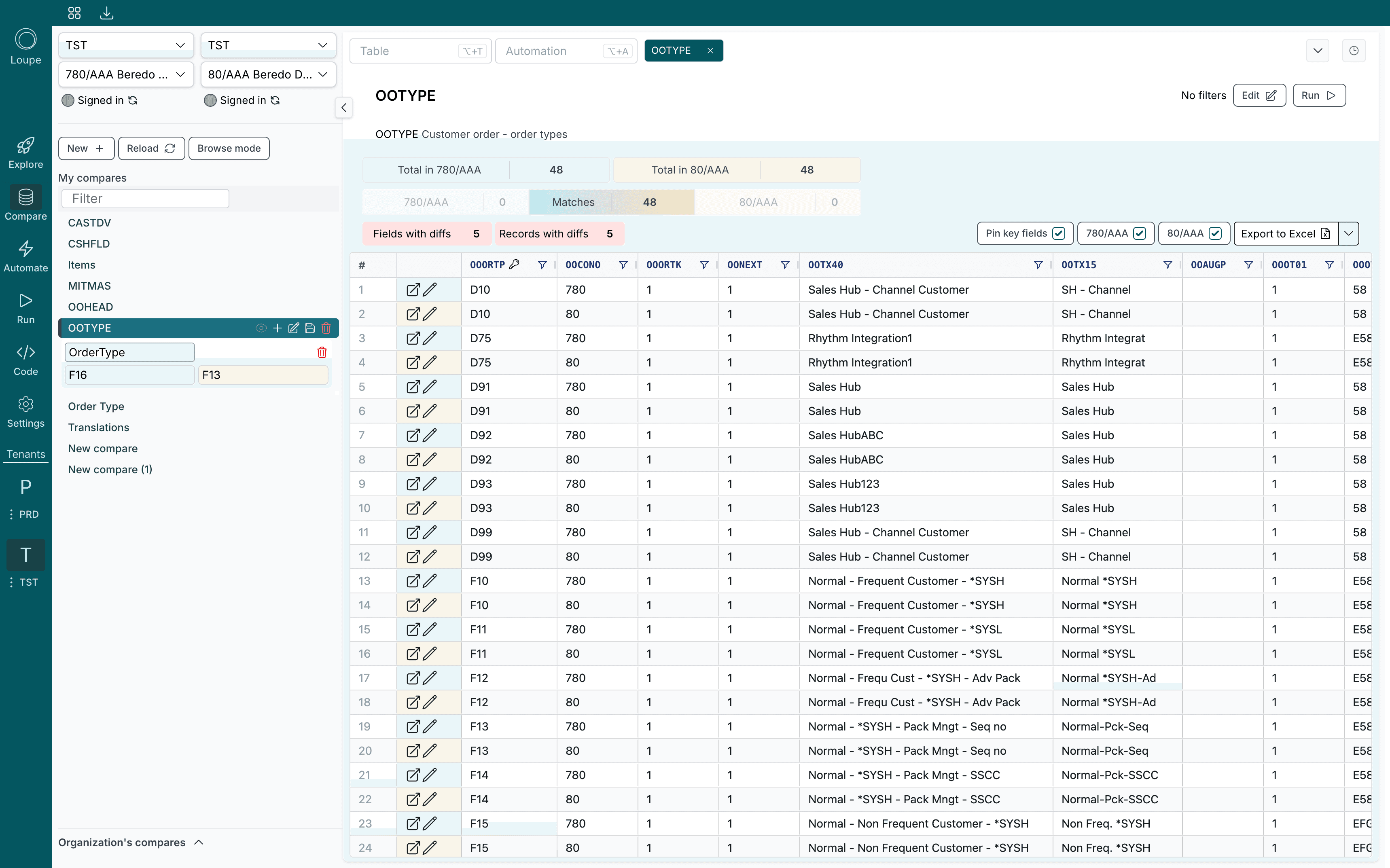
From two environments to the one field that differs
A compare answers three questions at once: what exists on one side only, what exists on both, and which of the shared records do not match.
Pick both sides
Add the tables
Read the differences
Only the differences that matter
A table with a hundred columns and thousands of rows is not a comparison, it is a haystack. Loupe narrows it down to what you actually need to look at.
- Fields with differences. Hide every column that matches, so the grid shows only the fields where the two sides disagree.
- Records with differences. Hide every row that matches, and see missing records marked on the side that does not have them.
- Filters on any column. Combine conditions with and and or. Compare variables let a filter use a different value on each side, like a different company number.
- Choose what counts. Decide per field whether it shows, whether it is compared, and whether it is part of the key. Audit fields are left out by default.
- Open the record in M3. Every row opens its M3 program at that record, in display or change mode, so fixing a difference is one click away.
What teams compare
The same check, run whenever something moves between environments.
Before go live
After a rollout
Master data drift
Test data
Save it once, run it every release
A compare you build once becomes a check anyone on the team can rerun.
- Saved automatically. Tables, filters, columns and variables save as you work, with a revision history you can restore from.
- Shared with the team. Share a compare with specific people or the whole organisation. Others can run it and copy it without changing yours.
- Exported to Excel. Export the result to Excel with differing cells filled red, or to CSV for very large tables.
- Straight into an automation. Use an exported difference file as the input for an automation that fixes it, from the same app.
Questions about Compare
- Which M3 tables can I compare?
- Any of them. Search for a table such as MITMAS, OOTYPE or CIDMAS, add it, and Loupe reads it from both sides. You can also compare the output of a read only automation.
- Can I compare two companies in the same environment?
- Yes. Each side is an environment plus a company and division, so you can compare TST against PRD, two companies in one environment, or two different tenants.
- Does Compare change anything in M3?
- No. Compare only reads. When you want to act on the differences, export them and use the file as the input for an automation, where every change is confirmed before it runs.
- Why do records show as different when only the change date moved?
- They should not. Audit fields such as the registration and change dates, times and user are left out of the comparison by default, so only real differences count.
Found the differences?
Automate
Fix them in bulk with M3 API transactions, driven by the file you exported.
Only one environment?
Explore
Browse any table and run any MI transaction without setting up a compare.
Who can see what?
Security
Every read runs as your own M3 user, straight from the desktop app to M3.
Compare your own environments.
Bring TST and PRD. We will show you what differs, in the tables you care about.